iscsi 构建 RAC 共享存储
iSCSI简介
iSCSI(internet SCSI)技术由IBM公司研究开发,是一个供硬件设备使用的、可以在IP协议的上层运行的SCSI指令集,这种指令集合可以实现在IP网络上运行SCSI协议,使其能够在诸如高速千兆以太网上进行路由选择。iSCSI技术是一种新储存技术,该技术是将现有SCSI接口与以太网络(Ethernet)技术结合,使服务器可与使用IP网络的储存装置互相交换资料。
iSCSI是一种基于TCP/IP 的协议,用来建立和管理IP存储设备、主机和客户机等之间的相互连接,并创建存储区域网络(SAN)。SAN使得SCSI 协议应用于高速数据传输网络成为可能,这种传输以数据块级别(block-level)在多个数据存储网络间进行。SCSI结构基于C/S模式,其通常应用环境是:设备互相靠近,并且这些设备由SCSI 总线连接。
iSCSI 的主要功能是在TCP/IP 网络上的主机系统(启动器 initiator)和存储设备(目标器完整的iSCSI系统的拓扑结构如下:
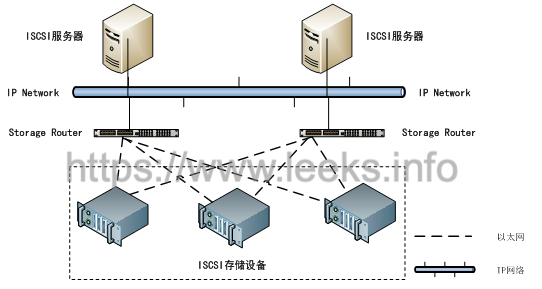
Centos下配置iscsi 共享存储
ISCSI存储分为服务端(server,提供target存储给客户端挂载使用)和客户段(client,使用服务端提供的target来存放文件等),Centos6.8下对应的agent为scsi-target-utils(服务端安装)和iscsi-initiator(客户端安装),以下的安装,全部是用虚拟机安装的。
我们在搭建RAC的时候会用到iscsi来构建共享存储,下面就介绍利用iscsi 怎样构建RAC的共享存储。
关闭防火墙
[root@ol7-122-rac1 ~]# systemctl stop firewalld
[root@ol7-122-rac1 ~]# systemctl disable firewalld
#防火墙如果沒有关掉,必须打开 iSCSI 所使用的 Port
[root@ol7-122-rac1 ~]# firewall-cmd --permanent --add-port=3260/tcp
[root@ol7-122-rac1 ~]# firewall-cmd --reload
修改 /etc/selinux/config 配置
[root@ehs-rac-01 ~]# sed -i 's/^SELINUX=.*/SELINUX=disabled/' /etc/selinux/config
[root@ehs-rac-01 ~]# setenforce 0
[root@ehs-rac-01 ~]# cat /etc/selinux/config | grep -i SELINUX= | grep -v "^#"
SELINUX=disabled
环境信息
server:10.0.7.135
rac1:10.0.7.110
rac2:10.0.7.120
这里我们选 server 为 iscsi 服务器,然后把其上的磁盘共享给 rac1 和 rac2 使用;
注:这里我们可以选用这个2个节点任何一台或者其他机器作为 iscsi 服务器;
首先我们在rac1上添加需要共享的磁盘,也就是rac的磁盘组。这里我已经在 server 上分配了6块盘,说明如下:
Ocrvotedisk 3块 4G
Data 1块 40G
FRA_ARC 1 块 20G
注:Data数据盘必须大于或等于 40G
server 端安装 iSCSI
首先安装管理工具
[root@ehs-server-01 ~]# yum install -y targetcli
启动 iSCSI 服务
[root@ehs-server-01 ~]# systemctl start target.service
[root@ehs-server-01 ~]# systemctl enable target.service
Created symlink from /etc/systemd/system/multi-user.target.wants/target.service to /usr/lib/systemd/system/target.service.
在 server 节点上查看
[root@ehs-server-01 ~]# fdisk -l
Disk /dev/vda: 42.9 GB, 42949672960 bytes, 83886080 sectors
Units = sectors of 1 * 512 = 512 bytes
Sector size (logical/physical): 512 bytes / 512 bytes
I/O size (minimum/optimal): 512 bytes / 512 bytes
Disk label type: dos
Disk identifier: 0x000ae6a1
   Device Boot      Start         End      Blocks   Id  System
/dev/vda1   *        2048     2099199     1048576   83  Linux
/dev/vda2         2099200    83886079    40893440   8e  Linux LVM
Disk /dev/mapper/rhel-root: 37.6 GB, 37576769536 bytes, 73392128 sectors
Units = sectors of 1 * 512 = 512 bytes
Sector size (logical/physical): 512 bytes / 512 bytes
I/O size (minimum/optimal): 512 bytes / 512 bytes
Disk /dev/mapper/rhel-swap: 4294 MB, 4294967296 bytes, 8388608 sectors
Units = sectors of 1 * 512 = 512 bytes
Sector size (logical/physical): 512 bytes / 512 bytes
I/O size (minimum/optimal): 512 bytes / 512 bytes
Disk /dev/vdb: 4294 MB, 4294967296 bytes, 8388608 sectors
Units = sectors of 1 * 512 = 512 bytes
Sector size (logical/physical): 512 bytes / 512 bytes
I/O size (minimum/optimal): 512 bytes / 512 bytes
Disk /dev/vdc: 4294 MB, 4294967296 bytes, 8388608 sectors
Units = sectors of 1 * 512 = 512 bytes
Sector size (logical/physical): 512 bytes / 512 bytes
I/O size (minimum/optimal): 512 bytes / 512 bytes
Disk /dev/vdd: 4294 MB, 4294967296 bytes, 8388608 sectors
Units = sectors of 1 * 512 = 512 bytes
Sector size (logical/physical): 512 bytes / 512 bytes
I/O size (minimum/optimal): 512 bytes / 512 bytes
Disk /dev/vde: 21.5 GB, 21474836480 bytes, 41943040 sectors
Units = sectors of 1 * 512 = 512 bytes
Sector size (logical/physical): 512 bytes / 512 bytes
I/O size (minimum/optimal): 512 bytes / 512 bytes
Disk /dev/vdf: 21.5 GB, 21474836480 bytes, 41943040 sectors
Units = sectors of 1 * 512 = 512 bytes
Sector size (logical/physical): 512 bytes / 512 bytes
I/O size (minimum/optimal): 512 bytes / 512 bytes
以上说明磁盘已经在 server 节点上挂载,下面就利用 iscsi 共享给 rac1 和 rac2 节点
配置 iscsi server服务端
安装 scsi-target-utils 已用 yum 安装完成,不需要操作
[root@ehs-server-01 ~]# rpm -q epel-release
package epel-release is not installed
[root@ehs-server-01 ~]# yum install -y epel-release
[root@ehs-server-01 ~]# rpm -q epel-release
epel-release-7-11.noarch
[root@ehs-server-01 ~]# yum --enablerepo=epel -y install scsi-target-utils libxslt
配置 targets.conf ,在文件末尾添加如下内容
[root@ehs-server-01 ~]# cat >> /etc/tgt/targets.conf << EOF
<target iqn.2019-09.com.oracle:rac>
    backing-store /dev/vdb
    backing-store /dev/vdc
    backing-store /dev/vdd
    backing-store /dev/vde
    backing-store /dev/vdf
    initiator-address 10.0.7.0/24
    write-cache off
</target>
EOF
iqn 名字可任意
initiator-address 限定 允许访问的客户端地址段或具体IP
write-cache off 是否开启或关闭快取
注:里面添加的就是想要共享给 rac1 和 rac2 的磁盘
启动 tgtd
[root@ehs-server-01 ~]# /bin/systemctl restart tgtd.service
[root@ehs-server-01 ~]# systemctl restart target.service
[root@ehs-server-01 ~]# systemctl enable tgtd
Created symlink from /etc/systemd/system/multi-user.target.wants/tgtd.service to /usr/lib/systemd/system/tgtd.service.
[root@ehs-server-01 ~]# tgtadm --lld iscsi --mode target --op show
Target 1: iqn.2019-09.com.oracle:rac
    System information:
        Driver: iscsi
        State: ready
    I_T nexus information:
    LUN information:
        LUN: 0
            Type: controller
            SCSI ID: IET     00010000
            SCSI SN: beaf10
            Size: 0 MB, Block size: 1
            Online: Yes
            Removable media: No
            Prevent removal: No
            Readonly: No
            SWP: No
            Thin-provisioning: No
            Backing store type: null
            Backing store path: None
            Backing store flags:
        LUN: 1
            Type: disk
            SCSI ID: IET     00010001
            SCSI SN: beaf11
            Size: 4295 MB, Block size: 512
            Online: Yes
            Removable media: No
            Prevent removal: No
            Readonly: No
            SWP: No
            Thin-provisioning: No
            Backing store type: rdwr
            Backing store path: /dev/vdb
            Backing store flags:
        LUN: 2
            Type: disk
            SCSI ID: IET     00010002
            SCSI SN: beaf12
            Size: 4295 MB, Block size: 512
            Online: Yes
            Removable media: No
            Prevent removal: No
            Readonly: No
            SWP: No
            Thin-provisioning: No
            Backing store type: rdwr
            Backing store path: /dev/vdc
            Backing store flags:
        LUN: 3
            Type: disk
            SCSI ID: IET     00010003
            SCSI SN: beaf13
            Size: 4295 MB, Block size: 512
            Online: Yes
            Removable media: No
            Prevent removal: No
            Readonly: No
            SWP: No
            Thin-provisioning: No
            Backing store type: rdwr
            Backing store path: /dev/vdd
            Backing store flags:
        LUN: 4
            Type: disk
            SCSI ID: IET     00010004
            SCSI SN: beaf14
            Size: 21475 MB, Block size: 512
            Online: Yes
            Removable media: No
            Prevent removal: No
            Readonly: No
            SWP: No
            Thin-provisioning: No
            Backing store type: rdwr
            Backing store path: /dev/vde
            Backing store flags:
        LUN: 5
            Type: disk
            SCSI ID: IET     00010005
            SCSI SN: beaf15
            Size: 21475 MB, Block size: 512
            Online: Yes
            Removable media: No
            Prevent removal: No
            Readonly: No
            SWP: No
            Thin-provisioning: No
            Backing store type: rdwr
            Backing store path: /dev/vdf
            Backing store flags:
    Account information:
    ACL information:
        10.0.7.0/24
配置 iscsi 客户端(所有rac节点)
安装 iscsi-initiator-utils,安裝 iSCSI Client 软件
[root@ehs-rac-01 ~]# yum install -y iscsi-initiator-utils
[root@ehs-rac-01 ~]# rpm -qa | grep iscsi
iscsi-initiator-utils-iscsiuio-6.2.0.874-10.el7.x86_64
libiscsi-1.9.0-7.el7.x86_64
iscsi-initiator-utils-6.2.0.874-10.el7.x86_64
##重启客户端
[root@ehs-rac-01 ~]# systemctl restart iscsid.service
配置 initiatorname.iscsi
[root@ehs-rac-01 ~]# vim /etc/iscsi/initiatorname.iscsi
InitiatorName=iqn.2019-09.com.oracle:rac
注:InitiatorName 值就是 server 上 /etc/tgt/targets.conf 里配置的值
启动iscsi
[root@ehs-rac-01 ~]# systemctl restart iscsi
[root@ehs-rac-01 ~]# systemctl enable iscsi.service
注:如果我安装操作系统时已经安装了 iscsi-initiator-utils 软件包所以不用再另外安装,直接配置就行。
共享存储(所有rac节点)
通过3260端口查看开放了哪些共享存储
[root@ehs-rac-01 ~]# iscsiadm -m discovery -tsendtargets -p 10.0.7.110:3260
10.0.7.110:3260,1 iqn.2019-09.com.oracle:rac
[root@ehs-rac-01 ~]# iscsiadm -m node -T discovery -T iqn.2019-09.com.oracle:rac -p 10.0.7.110:3260
# BEGIN RECORD 6.2.0.874-10
node.name = iqn.2019-09.com.oracle:rac
node.tpgt = 1
node.startup = automatic
node.leading_login = No
iface.hwaddress = <empty>
iface.ipaddress = <empty>
iface.iscsi_ifacename = default
...
登录共享存储
[root@ehs-rac-01 ~]# iscsiadm -m node -T iqn.2019-09.com.oracle:rac -p 10.0.7.110:3260 -l
Logging in to [iface: default, target: iqn.2019-09.com.oracle:rac, portal: 10.0.7.110,3260] (multiple)
Login to [iface: default, target: iqn.2019-09.com.oracle:rac, portal: 10.0.7.110,3260] successful.
探测下共享存储的目录
[root@ehs-rac-01 ~]# partprobe
[root@ehs-rac-01 ~]# fdisk -l
Disk /dev/vda: 42.9 GB, 42949672960 bytes, 83886080 sectors
Units = sectors of 1 * 512 = 512 bytes
Sector size (logical/physical): 512 bytes / 512 bytes
I/O size (minimum/optimal): 512 bytes / 512 bytes
Disk label type: dos
Disk identifier: 0x000ae6a1
   Device Boot      Start         End      Blocks   Id  System
/dev/vda1   *        2048     2099199     1048576   83  Linux
/dev/vda2         2099200    83886079    40893440   8e  Linux LVM
Disk /dev/mapper/rhel-root: 37.6 GB, 37576769536 bytes, 73392128 sectors
Units = sectors of 1 * 512 = 512 bytes
Sector size (logical/physical): 512 bytes / 512 bytes
I/O size (minimum/optimal): 512 bytes / 512 bytes
Disk /dev/mapper/rhel-swap: 4294 MB, 4294967296 bytes, 8388608 sectors
Units = sectors of 1 * 512 = 512 bytes
Sector size (logical/physical): 512 bytes / 512 bytes
I/O size (minimum/optimal): 512 bytes / 512 bytes
Disk /dev/sdb: 4294 MB, 4294967296 bytes, 8388608 sectors
Units = sectors of 1 * 512 = 512 bytes
Sector size (logical/physical): 512 bytes / 512 bytes
I/O size (minimum/optimal): 512 bytes / 512 bytes
Disk /dev/sda: 4294 MB, 4294967296 bytes, 8388608 sectors
Units = sectors of 1 * 512 = 512 bytes
Sector size (logical/physical): 512 bytes / 512 bytes
I/O size (minimum/optimal): 512 bytes / 512 bytes
Disk /dev/sdc: 4294 MB, 4294967296 bytes, 8388608 sectors
Units = sectors of 1 * 512 = 512 bytes
Sector size (logical/physical): 512 bytes / 512 bytes
I/O size (minimum/optimal): 512 bytes / 512 bytes
Disk /dev/sdd: 21.5 GB, 21474836480 bytes, 41943040 sectors
Units = sectors of 1 * 512 = 512 bytes
Sector size (logical/physical): 512 bytes / 512 bytes
I/O size (minimum/optimal): 512 bytes / 512 bytes
Disk /dev/sde: 21.5 GB, 21474836480 bytes, 41943040 sectors
Units = sectors of 1 * 512 = 512 bytes
Sector size (logical/physical): 512 bytes / 512 bytes
I/O size (minimum/optimal): 512 bytes / 512 bytes
退出共享存储目录
[root@ehs-rac-01 ~]# iscsiadm -m node -T iqn.2019-09.com.oracle:rac -p 10.0.7.110:3260 --logout
Logging out of session [sid: 1, target: iqn.2019-09.com.oracle:rac, portal: 10.0.7.110,3260]
Logout of [sid: 1, target: iqn.2019-09.com.oracle:rac, portal: 10.0.7.110,3260] successful.
# fdisk -l (将查看不到共享目录)
[root@ehs-rac-01 ~]# fdisk -l
Disk /dev/vda: 42.9 GB, 42949672960 bytes, 83886080 sectors
Units = sectors of 1 * 512 = 512 bytes
Sector size (logical/physical): 512 bytes / 512 bytes
I/O size (minimum/optimal): 512 bytes / 512 bytes
Disk label type: dos
Disk identifier: 0x000ae6a1
   Device Boot      Start         End      Blocks   Id  System
/dev/vda1   *        2048     2099199     1048576   83  Linux
/dev/vda2         2099200    83886079    40893440   8e  Linux LVM
Disk /dev/mapper/rhel-root: 37.6 GB, 37576769536 bytes, 73392128 sectors
Units = sectors of 1 * 512 = 512 bytes
Sector size (logical/physical): 512 bytes / 512 bytes
I/O size (minimum/optimal): 512 bytes / 512 bytes
Disk /dev/mapper/rhel-swap: 4294 MB, 4294967296 bytes, 8388608 sectors
Units = sectors of 1 * 512 = 512 bytes
Sector size (logical/physical): 512 bytes / 512 bytes
I/O size (minimum/optimal): 512 bytes / 512 bytes
删除共享存储目录
[root@ehs-rac-01 ~]# systemctl restart iscsi.service
[root@ehs-rac-01 ~]# iscsiadm -m node -T iqn.2019-09.com.oracle:rac -p 10.0.7.110:3260 --logout
[root@ehs-rac-01 ~]# iscsiadm -m node -T iqn.2019-09.com.oracle:rac -p 10.0.7.110:3260 -o delete
重新服务并重新创建登录
[root@ehs-rac-01 ~]# systemctl restart iscsi.service
[root@ehs-rac-01 ~]# iscsiadm -m discovery -t sendtargets -p 10.0.7.110:3260
[root@ehs-rac-01 ~]# iscsiadm -m node -T iqn.2019-09.com.oracle:rac -p 10.0.7.110:3260 -l
为共享存储分区创建目录
# fdisk -l 我们发现多了一个sdb